




 1115 / 4910

TML Harrier Infotainment Reflashing
and Replacement Spec
TITLE :
TML Harrier Infotainment Reflashing and Replacement Spec
Doc No:
Date
: 10
th
Dec 18
Revision
: 0.3
Page: 9 of 15
Prepared : Pritam B
Checked: Phani Kumar J
Approved: Anand Sikchi
This specification is the exclusive property of Tata Motors Limited. Without their consent it may not be
reproduced or given to third parties
.
The above specifications are subject to change and therefore suppliers
are requested to refer the latest one.
CONTROLLED COPY FOR RESTRICTED CIRCULATION
© TATA MOTORS LTD.
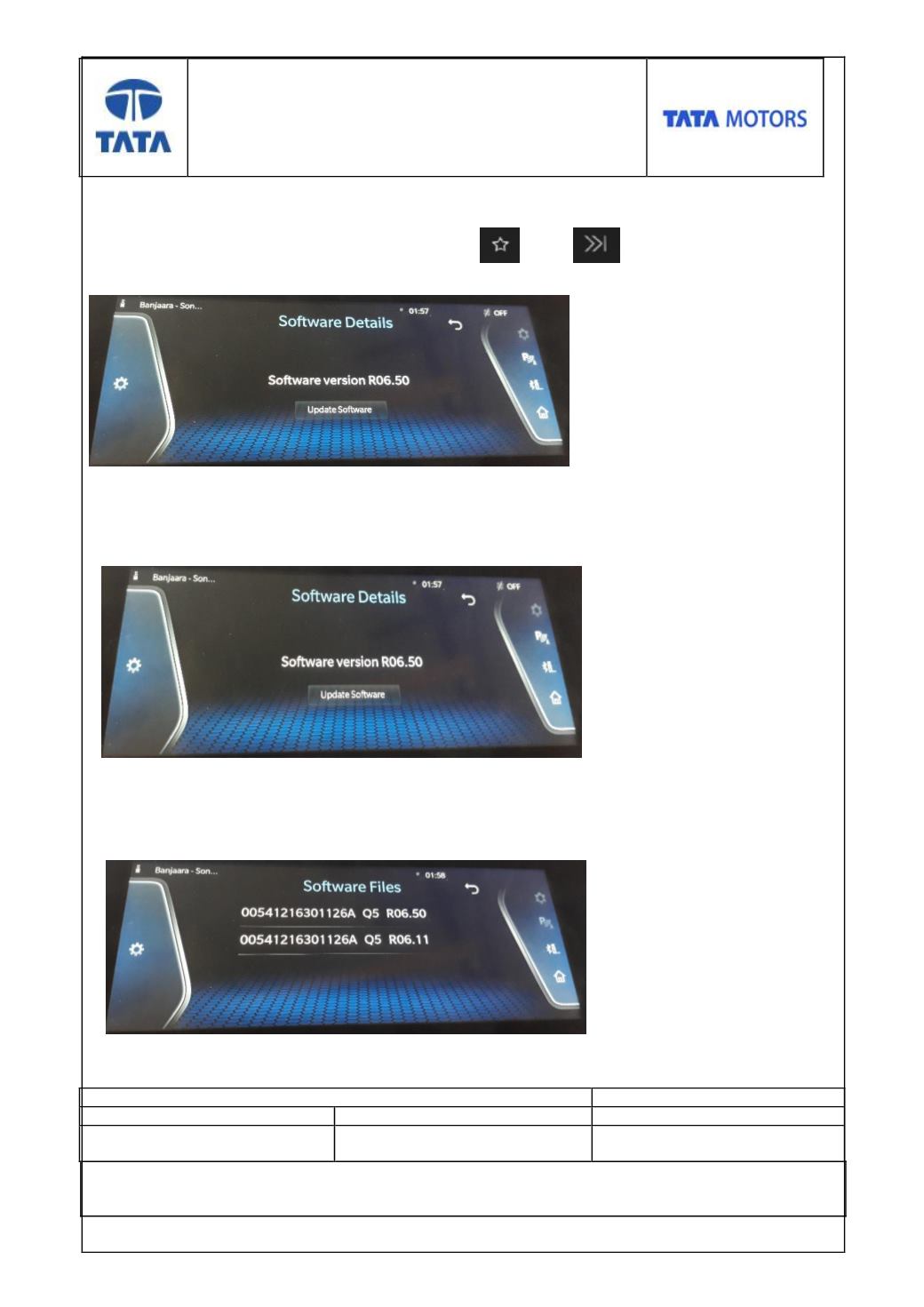
Step 6
To initiate Infotainment reflashing enter into software details screen by using predefined
key combinations at once (
Key combination 2
nd
and 4
th
key of button panel
).
Step 7
In the software details screen, select “Update” Software option and System
shall update
the user to enter into switch off mode (if already not in it)..
Step 8
After selecting “Update Software” option in Switch Off Mode System shall display all valid
software flash files available in the USB root folder.