



 1448 / 1863

ELECTRICAL
146
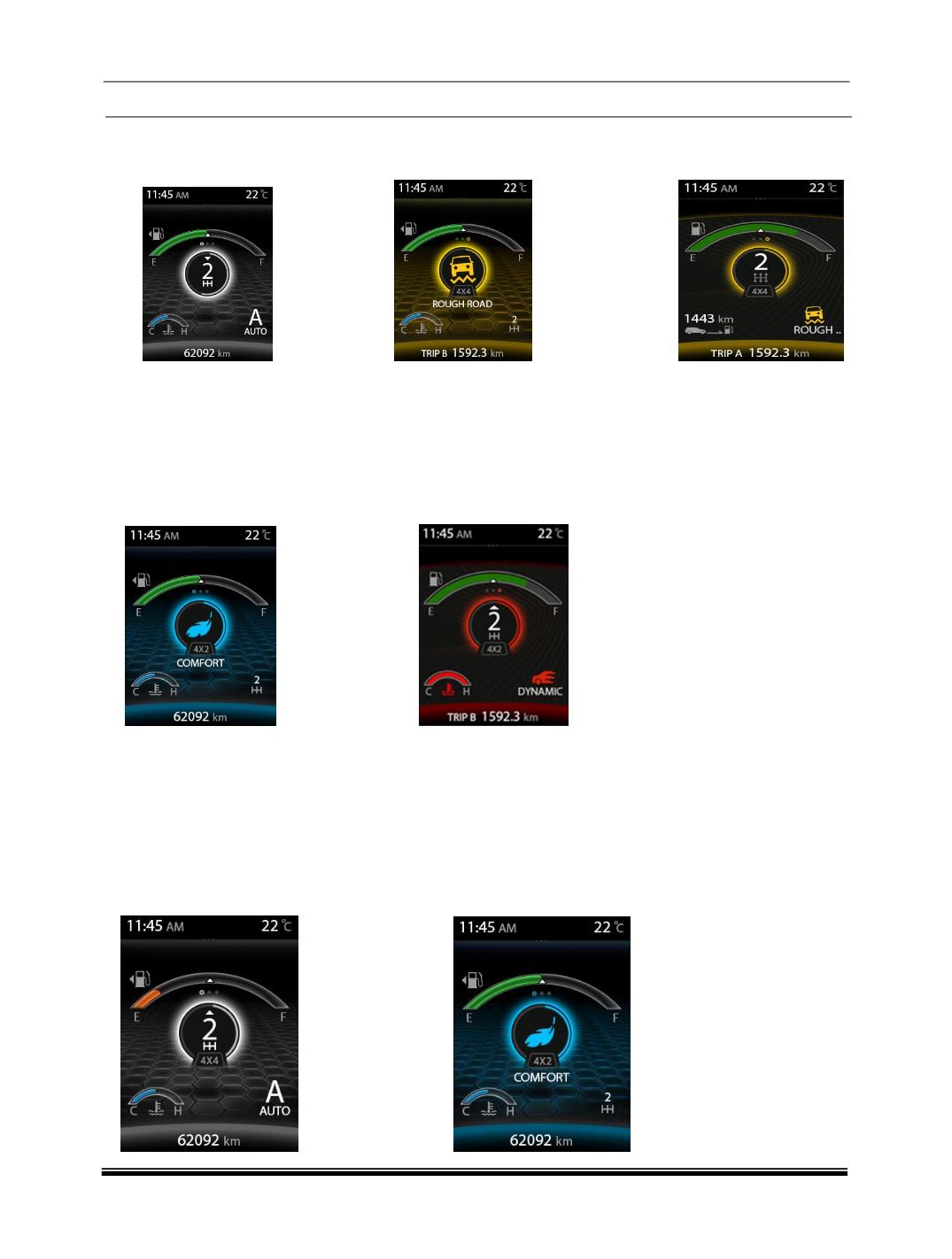
Current Drive mode (AUTO) User Changed Mode (ROUGH ROAD)
POP UP For 3 sec
After 3 sec
COMFORT to DYNAMIC mode
When the User is selecting the Drive mode from COMFORT to DYNAMIC mode, the mode change progress
shall be completed approximately 1 sec and the Drive mode “DYNAMIC “shall be POP UP for 3 sec in the
center of the display, after 3 sec the current gear no shall be displayed in the center of the display and Drive
mode shall be displayed in the right bottom of the display and the back ground theme shall change from
Cyan to Red color.
Current Drive mode (AUTO) User Changed Mode (DYNAMIC)
b) Vehicle applicability: XT (without TOD)
When the user is selecting the Drive mode from AUTO to COMFORT the selected Drive mode shall be POP
UP in the Instrument cluster and the Drive mode shall be POP UP for max 3 secs in the center of the display
within approximately after 1sec, after 3sec the current gear no shall be displayed in the center of the display
and Drive mode shall be displayed in the right bottom of the display and the back ground theme shall change
from White to Cyan color.
Current Drive mode (AUTO)
User Changed Mode (COMFORT)