



 755 / 948

ELECTRICAL
130
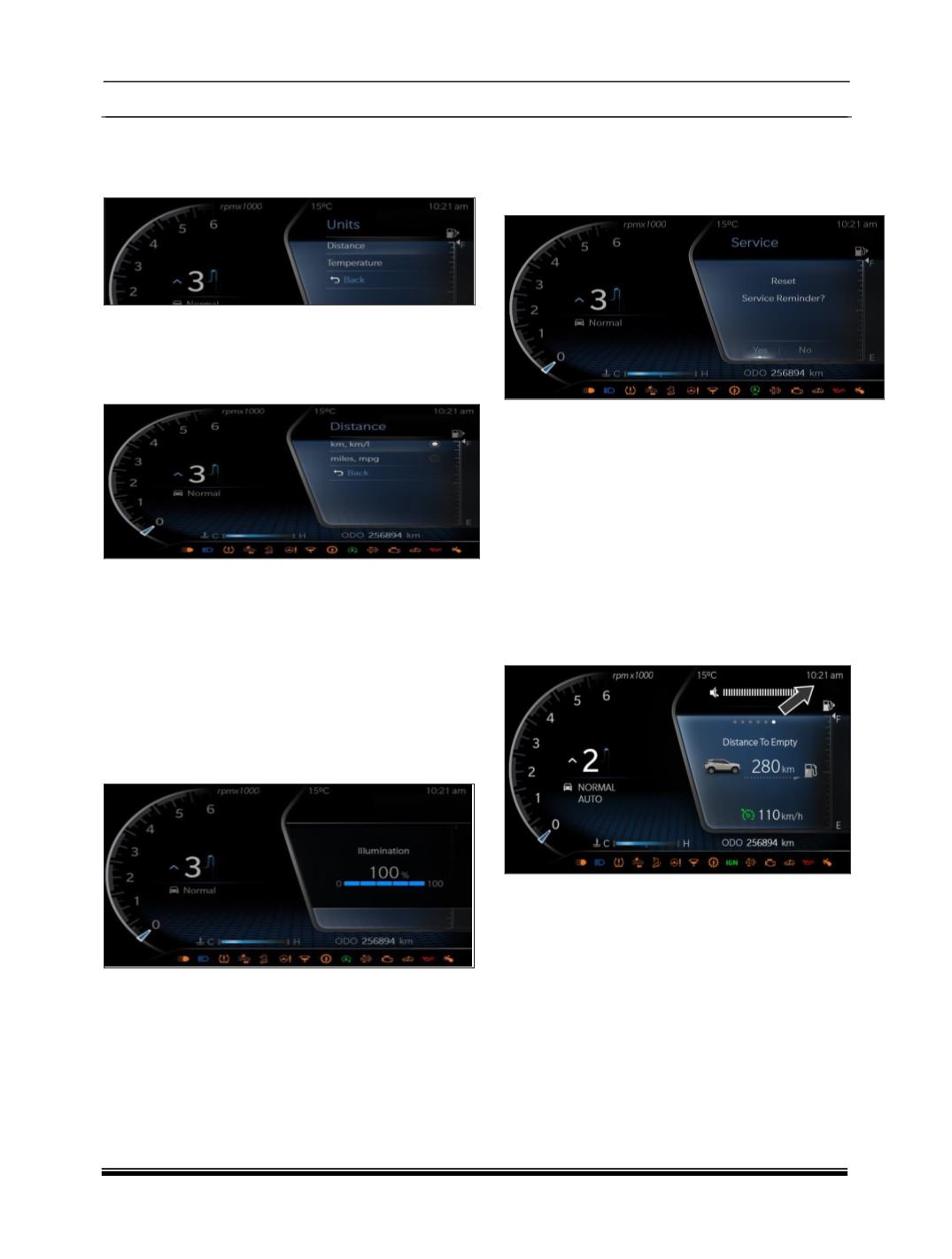
UNITS SETTING
1. User can select Units Setting by pressing Set
Button.
2. Units setting include Distance & Temperature
Units Setting.
3. User can select Distance Setting by pressing
Set Button.
4. Distance Unit Setting includes Km, Km/l &
miles, mpg settings.
5. Temperature Unit Setting includes °C & °F.
6. Distance & Temperature Unit setting is
applicable in Export Market Only.
ILLUMINATION SETTING
1. User can select Illumination Setting by Scroll
down & pressing Set Button in Setting
Screen.
2. User can increase the illumination from (20%
to 100%) in 5 steps by using UP & SET
Button
3. User can decrease the illumination from (100%
to 20%) in 5 steps by using DOWN & SET
Button.
SERVICE REMINDER RESET
1. User can select Service Reminder Screen by
Scroll down & pressing Set Button in Setting
Screen.
2. User can reset the Service Reminder Symbol
by UP / DOWN & SET Buttons.
Note:
1. To enter into the settings menu the vehicle
speed should be 0 Kmph.
2. In the Setting menu there is no user input for
10 sec the previous screen shall be displayed
CLOCK
1. Instrument Cluster equipped with digital clock
which indicates current time in 12 / 24 hours
mode