




 1827 / 1906

HVAC
13
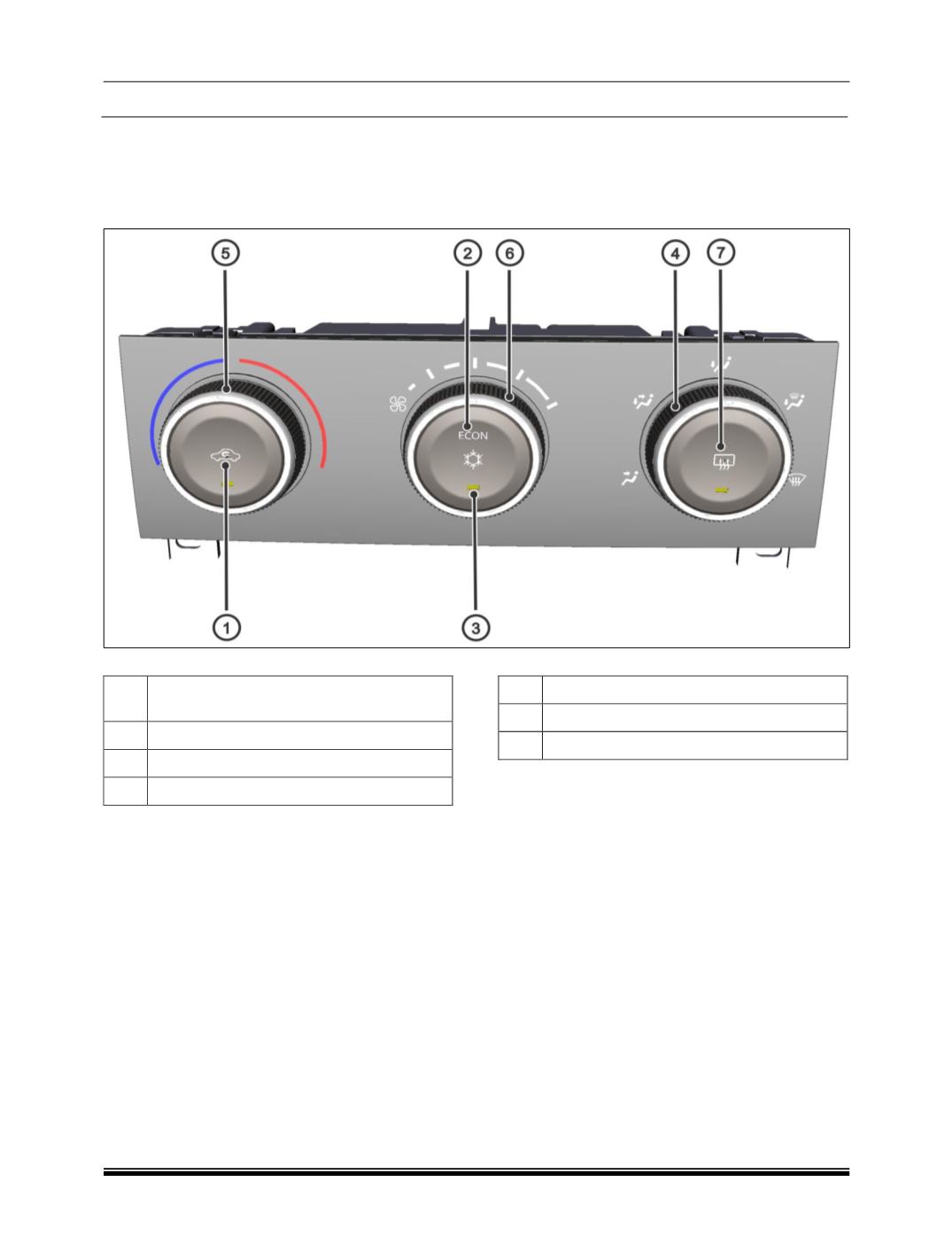
A. CONTROL PANEL
NOTE
The removal and refitment of all components are covered in “On Vehicle Repairs” in this section.
01
RECIRCULATION / FRESH AIR CON-
TROL
02
ECONOMY AC
03
NORMAL AC
04
MODE SELECTION
05
TEMPERATURE SELECTION
06
BLOWER SPEED
07
REAR DEFOG / ORVM DEFOG
The HVAC control panel consists of 3 Push buttons
and 3 rotary knobs that can be used to set the re-
quired temperature inside the cabin. In addition to
this the control panel also acts as a control unit for
the HVAC system in which all the software calibra-
tions are embedded.
1. PUSH BUTTONS
a. RECIRCULATION / FRESH AIR
(AMBER LED)
This is a push button that can be used to position the
Air inlet door, either to allow fresh air to come inside
the cabin or to recirculate the air within the cabin.
b. NORMAL AC / ECONOMY AC
This is a non- latching switch that can be used to
choose Normal AC, Economy AC or to switch OFF
the AC.
When it is pressed once Normal AC mode
(Amber
LED glows)
is selected, when pressed again Econ-
omy AC
(Green ‘ECON’ indicator comes ON) is
selected and if pressed again “Both A.C and ECON
functions are switched OFF.”
c. REAR DEFOG /ORVM DEFOG
This is a push button used to switch ON the rear
defog heater grids on the rear window, to enable the
clearing/ defogging of the rear window. The rear
defog switches OFF after a pre-determined time of
approximately 15mins. You can also deactivate by
pressing Rear defog button.