




 592 / 1236

Rear Axle
24
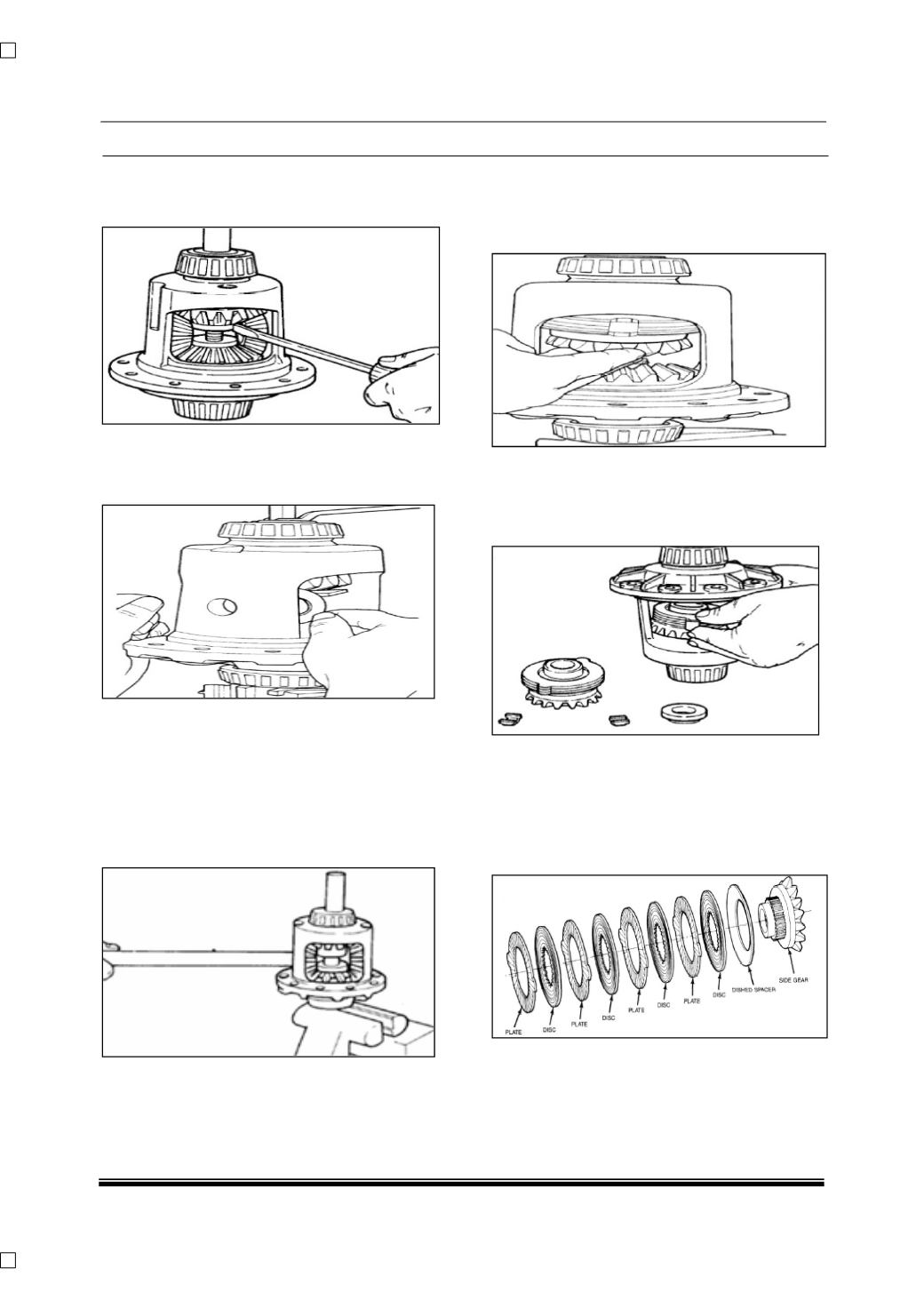
Assemble the adaptor plate into the bottom side
gear. Apply small amount of grease to centering
hole of adaptor plate.
Assemble threaded adaptor in top side gear
Use small screw driver to position in slot of
threaded adaptor.
Torque forcing screw until it becomes slightly
tight.
Remove both pinion mate spherical washers.
Use shim stock of 0.76mm (0.030”) thick or
equivalent to push out spherical washer.
Relieve Tension of the Belleville springs by
loosening the forcing screw.
Insert small OD end of turning bar into cross pin
hole of case. Pull on bar and case will rotate until
the pinion mate gears can be removed from
opening.
It might be necessary to adjust the forcing screw
slightly to allow the case to rotate.
Hold top clutch pack with one hand & remove
tools.
It might be necessary to hold threaded adaptor
with screw driver as shown in.
Remove top side gear and clutch pack. Keep the
stack of plates and discs intact in exactly the
same position while they are being removed.
Remove the case from the axle shaft. Turn case
with the flange or ring gear side up and allow the
step plate, side gear and clutch pack to be
removed from the case.
Remove the retainer clips from both clutch packs
to allow separation of plates and discs. Keep the
stack of plates and discs exact as they were
removed.