



 919 / 1575

ELECTRICAL
99
ELECTRICAL
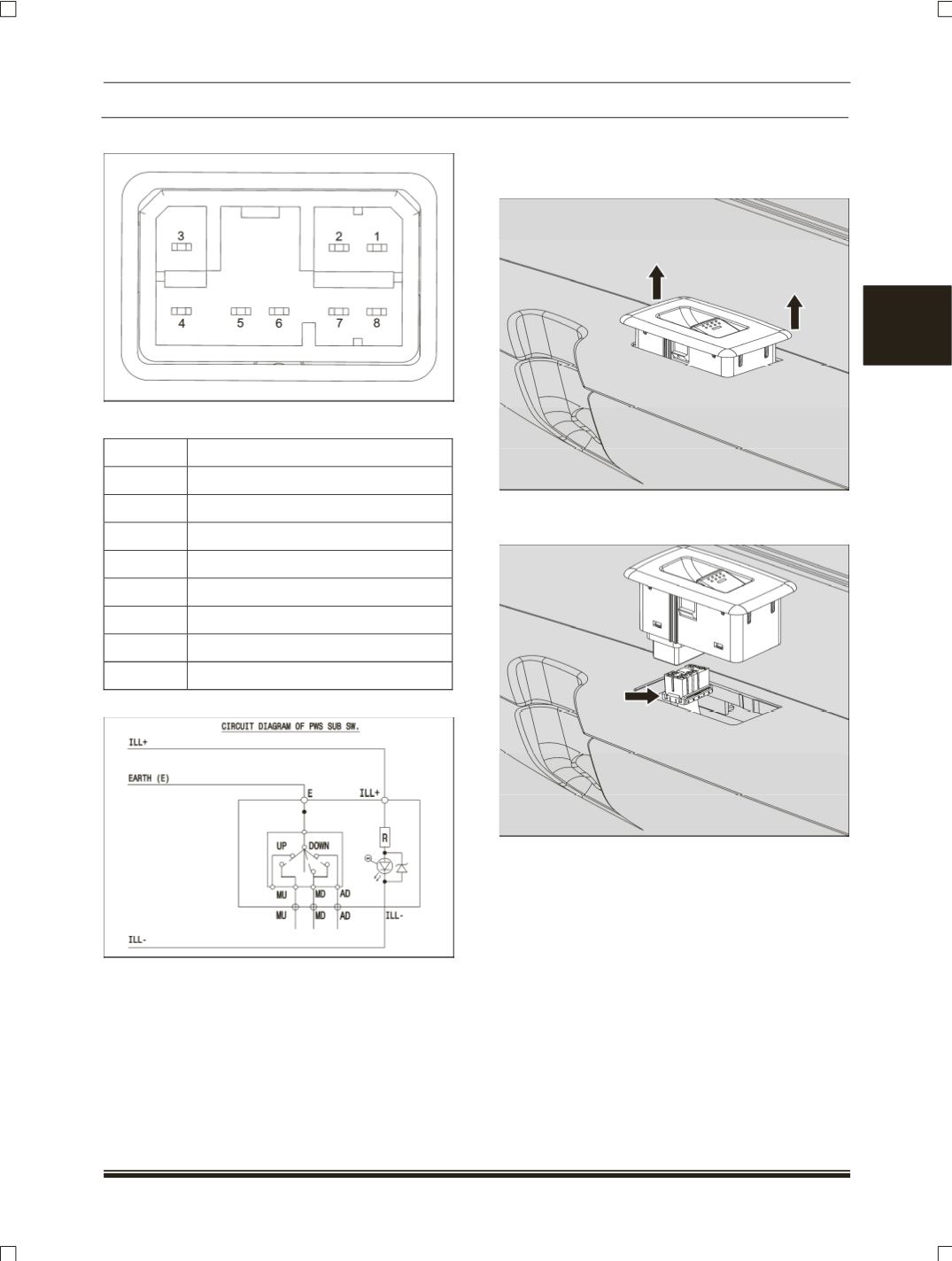
CONNECTOR DETAILS
:
PINOUT DETAILS:
SR.NO.
DESCRIPTION
1
Illumination + ( ILL + )
2
Illumination - ( ILL - )
3
Empty
4
Auto Down ( AD )
5
Manual Up ( MU )
6
Empty
7
Manual Down ( MD )
8
Earth
CONNECTION DETAILS
:
REMOVAL:
1. Pry out the Driver window winding switch from
armrest assembly
.
2. Disconnect the electrical connection of window
winding switch.
3. Take out the Rear window winding switch.
REFITMENT:
Follow the reverse procedure for the fitment
.
INSPECTION:
Window Winding switches:
1. Check the basic function (
Manual operation
function)
.
Turn the ignition switch ON.
Check that the door glass move up when the
power window switch from driver door switch is