




 997 / 1133

ELECTRICAL
225
5. Do not add any accessory, which will obstruct
camera field of view.
CLEANING CAMERA
1. Due to environmental reasons, dust, mud or
fog may accumulate on the camera lens. So
regularly clean the camera lens.
2. Use water to clean the camera lens. Do not
use extreme cold extreme hot water. Rapid
changes in temperature may brittle the camera
lens.
3. Wipe the camera lens with soft cloth.
4. Do not use hard cloth or material to wipe the
camera lens. This will cause scratches on the
camera, and leads to deteriorated visual image
on the display.
5. Do not apply organic solvent, car wax, window
cleaner or glass coat to clean the camera. If
this is applied, wipe it off as soon as possible.
6. Do not apply heavy force on lens, while
cleaning.
7. Do not remove mud, snow on the camera lens
using stick or hard material
1.30.2 ECU TO SENSOR ELECTRICAL INTERFACE
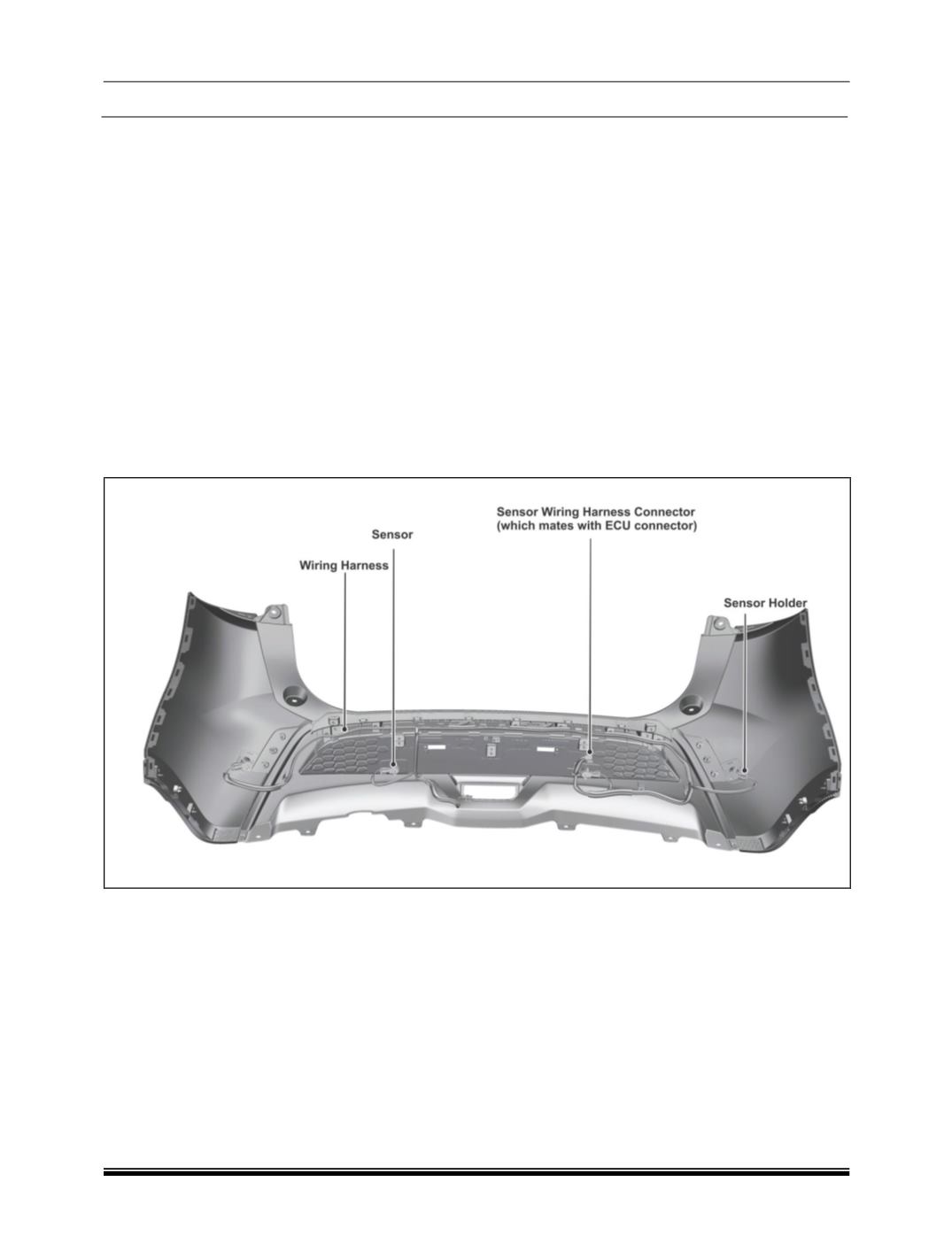
Ultrasonic sensors shall be mounted on the rear bumper and hardwired to the PDC ECU. PDC ECU shall
power and control the sensors. Both power and ground of the sensors shall be connected to the PDC ECU
itself.
In some vehicles, ‘Park Assist Button’ in facia switch bank may not available. In this case, please ignore this
chapter.