




 1581 / 1906

ELECTRICAL
279
2.7. X M A , X M A ( 4 X 4 ) Drive Mode and Gear Display
2.7.1. Drive mode indicator
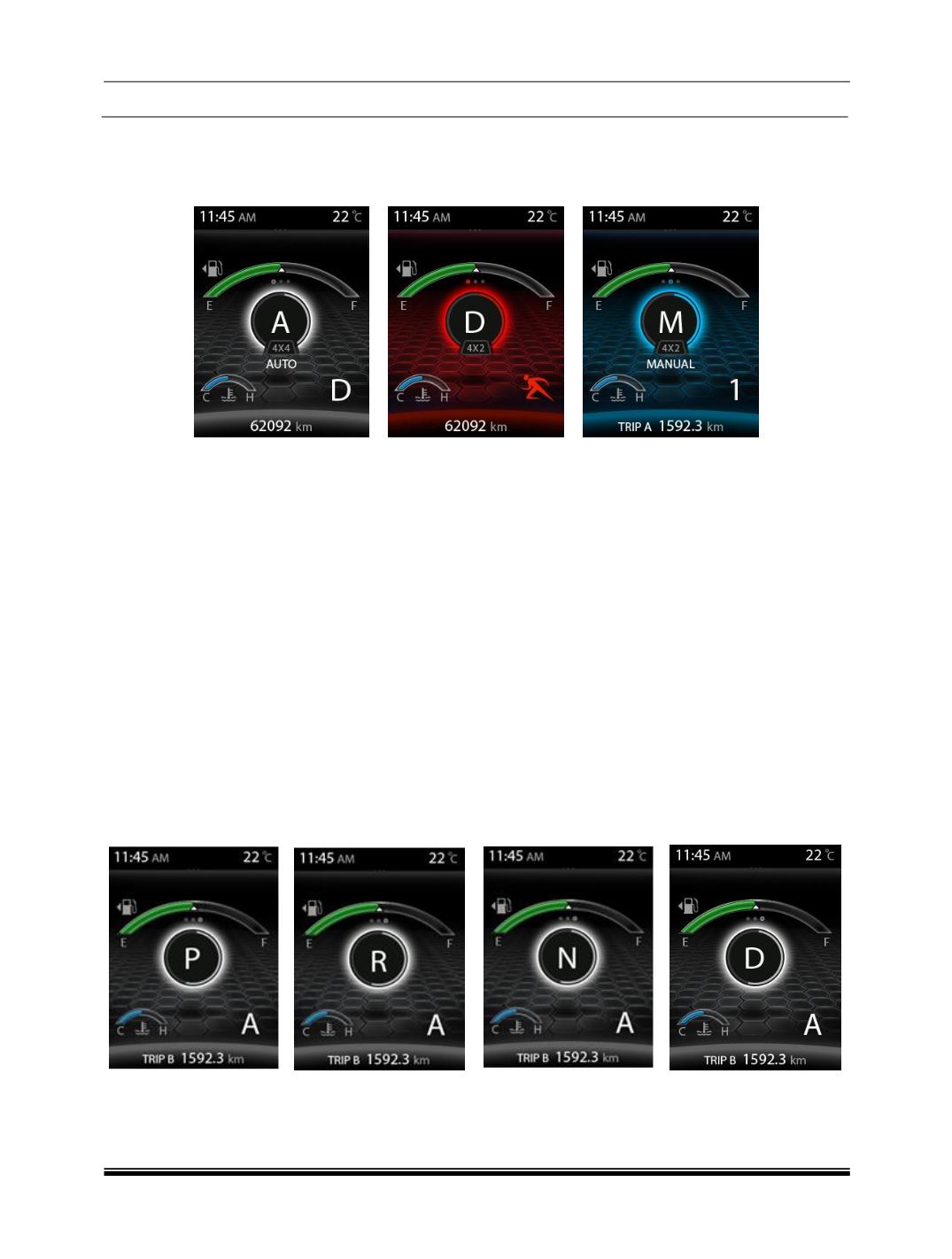
IPC shall display Auto, SPORT based on the user selection by the gear.
2.7.1.1. Auto Mode
This display shows vehicle is in Auto drive mode and background will be in White in color and 4x4 indicates
the vehicle is in four-wheel drive mode.
2.7.1.2. Sport Mode
This display shows vehicle is in Sport mode and the theme will be in Red color and 4x2 indicates the vehicle
is in two-wheel drive mode
2.7.1.3. Manual Mode
This display shows vehicle is in Manual mode and the theme will be in Blue color and 4x2 indicates the
vehicle is in two-wheel drive mode.
Note
The TOD mode display is applicable for only for XMA (4X4) variant
If no change in the mode, and only Auto mode is available, take your vehicle to authorized TATA
service center.
2.7.2. Gear Indicators
Automatic Gear Indicator
The below screen indicates that the Gear lever in various positions PRND and Drive mode as SPORT.