




 671 / 745

ELECTRICAL
29
1.6 DRIVER INFORMATION SYSTEM (For Q5 4" Instrument Cluster)
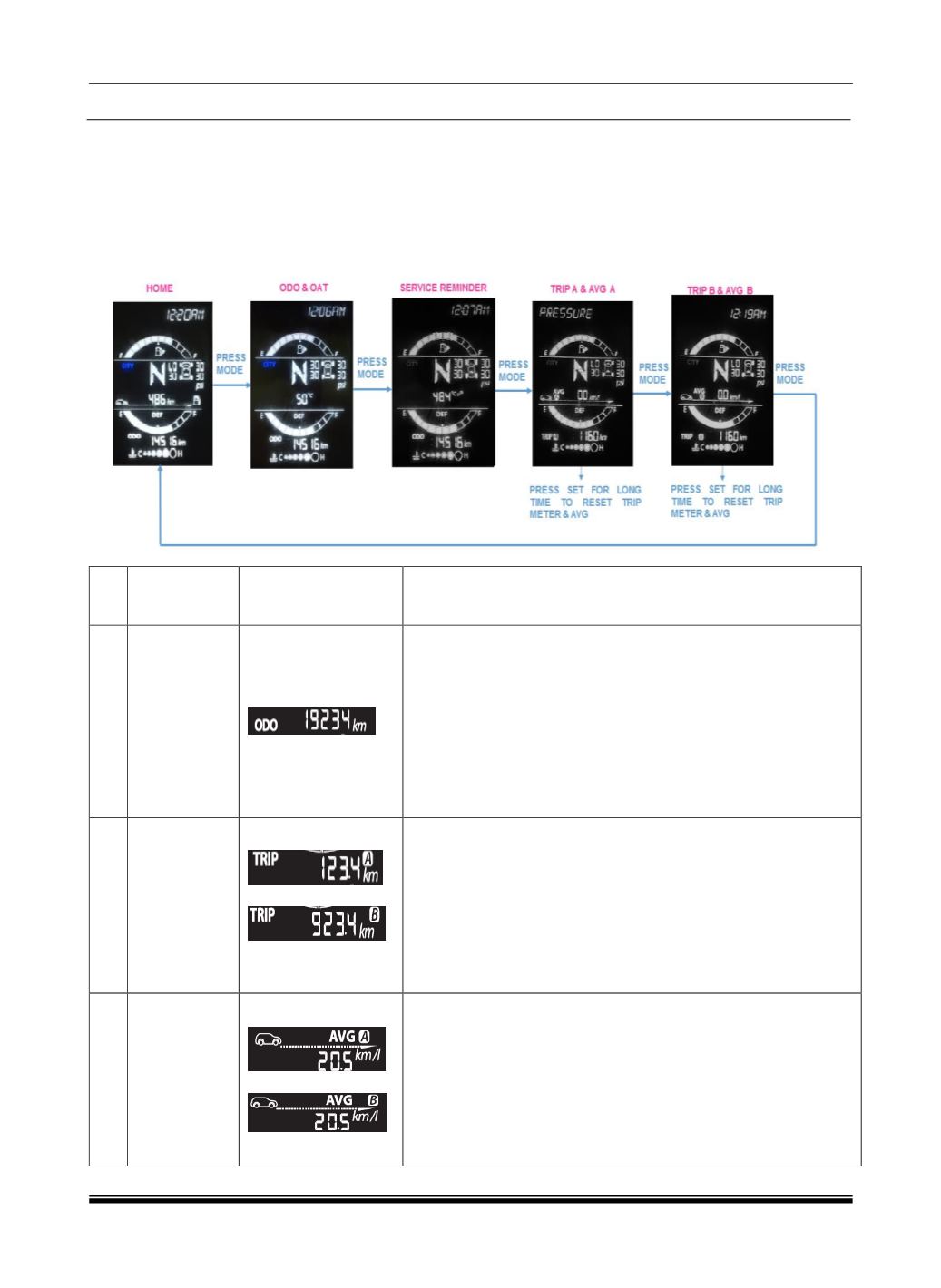
Operate the Mode Button to see the DTE, DEF Gauge, TPMS, TRIP A & AFE A, TRIP B & AFE B, and
IFE screens.
Operate the Set Switch Long Press to Reset TRIP A & AFE A (When TRIP A is displayed) and Reset
TRIP B & AFE B (When TRIP B is displayed)
DIS Screen Flow (LCD Screen)
Sr
No
Driver
Information
System
Image
Description
1
Odometer
Indicates distance travelled by a vehicle
Range: 0 to 999999
Resolution: 1 km
The Odometer reading does not over flow to “0” when
maximum value is reached, the display shall freeze to
maximum value and not resettable
Note:
User can change the Distance unit as km or miles (mi) using
SET and MODE buttons.
‘mi’ is applicable for Export variant only.
2
Trip meter A
& B
Indicates distance travelled by a vehicle in Trip mode.
Range: 0.0 to 9999.9 (5 digits)
Resolution: 0.1 km
Trip meter reading becomes “0.0” after it crosses 9999.9 km.
Note: User can reset Trip meter using SET button by long
press
User can change the Distance unit as km or miles (mi) using
SET and MODE buttons.
‘mi’ is applicable for Export variant only.
3
Average Fuel
Economy for
Trip A and
Trip B
Displays “Average Fuel consumption” for trip A or B since it
was reset
Resolution: 0.1 km/l
Average Fuel Consumption shall Reset to 0 when respective
Trip meter is reset.
Average Fuel Economy shall be displayed as
‘--.-‘for initial 0.5 km of respective trip. Once 0.5 km distance is
covered, Average Fuel Economy shall be displayed.
Even after 0.5 km distance covered for particular trip, Average