



 736 / 948

ELECTRICAL
111
The Smart Key permits or denies the passive
access to the vehicle based on the received RSSI
and security validation. Passive key facilitates the
user to access the vehicle without actively using
the key fob ensuring comfort and security. Smart
Key consist of 4 buttons namely lock, unlock,
tailgate unlock and approach lamp button.
1. Vehicle Unlock Operation
When Vehicle is in locked condition and user
presses unlock button on Smart Key, all doors gets
unlocked. After successful unlock, flasher
indication comes ON once.
2. Vehicle Lock Operation
When vehicle is in unlocked condition and all doors
are closed and user presses the lock button on
Smart Key, Vehicle gets centrally locked. After
successful lock, flasher indication comes ON twice.
After unsuccessful lock, reverse unlock happens in
case of driver door ajar condition and slam lock
happens in case of other door ajar condition with
mis-lock sound.
3. Approach Light Operation
Approach light ON operation:
When vehicle is in OFF mode (ACC, IGN and
Crank are OFF) and user presses the Approach
Light button on Smart Key, Approach lights (Low
beam, position lamps and roof lamp) turns ON.
Approach light OFF operation:
When user presses the Approach Light button
again if approach lamps are ON OR Approach
lamp timer elapses Approach Light turns OFF.
4. Tailgate Release Operation
When vehicle is lock and vehicle power mode is
OFF
If tailgate switch is pressed within 30 second after
RKE tailgate command, tailgate gets unlock
independent of smart key.
When vehicle is unlock
If first RKE tailgate unlock is pressed and
then vehicle ignores RKE tailgate unlock
command.
NOTE
Tailgate cannot be locked using tailgate button
on Smart Key.
If smart key battery is low/drained or vehicle
battery is low/drained, user can unlock and
enter into vehicle by using mechanical key
blade. Present inside the smart key. Refer
‘Starting and Driving’ section for more
information.
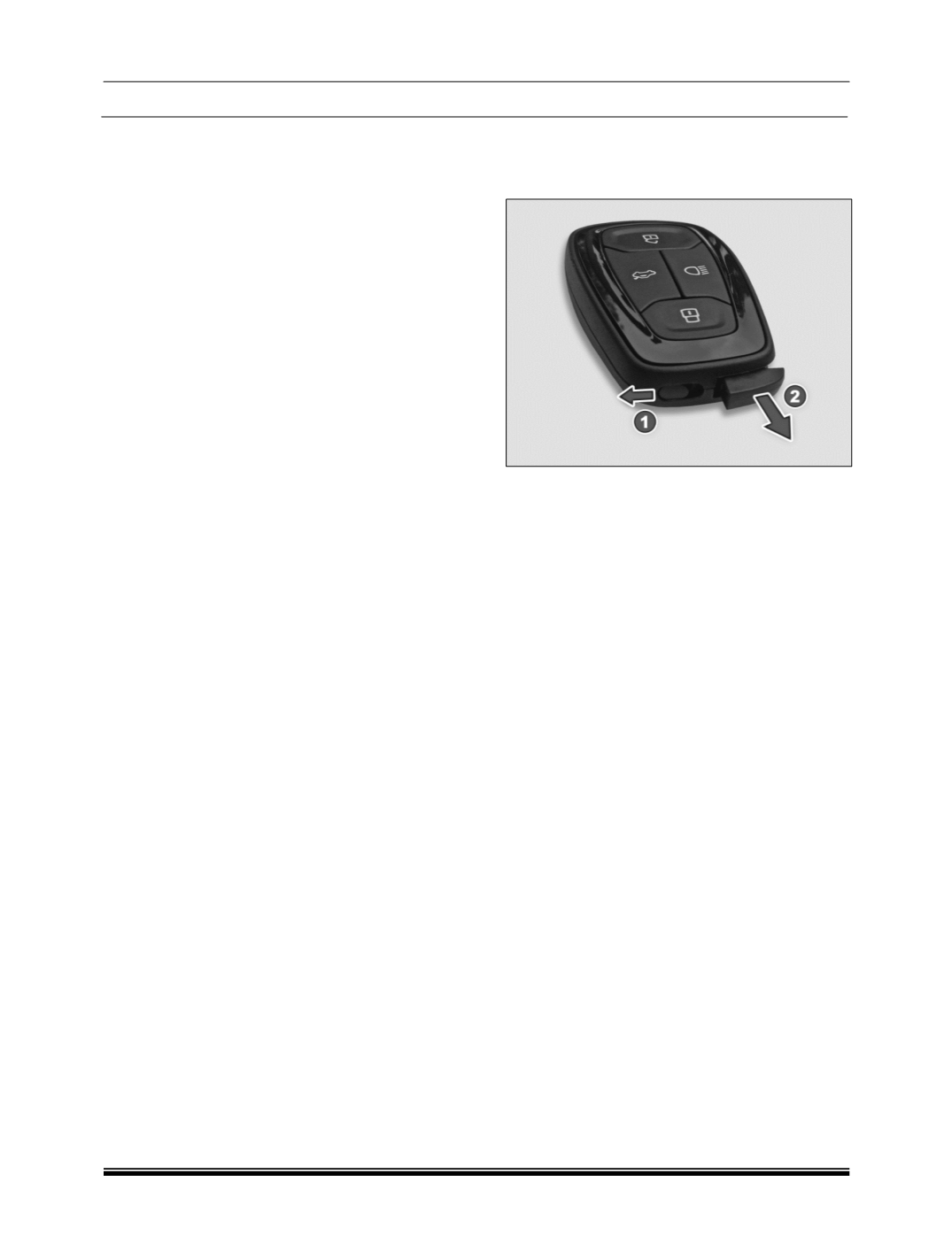
Key blade in / out
Slide the knob (1) to unlatch the key. Pull the key
blade (2) out.
Smart Key Features
Vehicle search
ln vehicle locked condition if lock button on remote
key is pressed the turn indicators of vehicle flashes
4 times.
Automatic activation of immobilizer
If smart key will not found within the passenger
compartment, engine will be immobilized and
vehicle cannot be start.
Auto locking / unlocking of doors / auto relock
ln case of PEPS variants, door will get unlocked
when ignition is OFF by pressing Start Stop switch.
Anti-grab / anti-scan coding
The remote control set of this security system is
protected against the use of devices called
‘scanners’ and ‘grabbers’ which can record and
reproduce some types of remote codes.
Important
Don't operate Unlock button of remote while in the
vicinity of your vehicle, as it could lead to an
unintentional unlocking your vehicle.
For battery, replacement procedure refer
‘MAINTENANCE’ section.
Don't remove the battery connection of the vehicle
while the vehicle has been locked by remote.
Smart key Precautions