



 883 / 1131

ELECTRICAL
113
Also, when unlocked with remote key and if no
door is opened within 30 sec- onds, vehicle doors
get automatically locked.
Anti-grab / anti-scan coding
The remote control set of this security system is
protected against the use of devices called
‘scanners‘ and ‘grabbers’ which can record and
reproduce some types of remote codes.
Sleep Mode
If remote key is not used for more than a week
then its functionalities will turn to sleep mode. In
such a case, to activate the remote key
functionalities, open the door mechanically with
the key blade.
NOTE
In case any button of the key is accidentally
pressed for more than 20 seconds, the remote
stops functioning till the time the button is
pressed. The LED on the Remote also stops
glowing. The function of the remote gets
reinstated immediately when the user stops
pressing the push button of remote.
2. SMART KEY
Keep the smart key with user to perform the
passive access. It is used for locking, unlocking
and starting the vehicle.
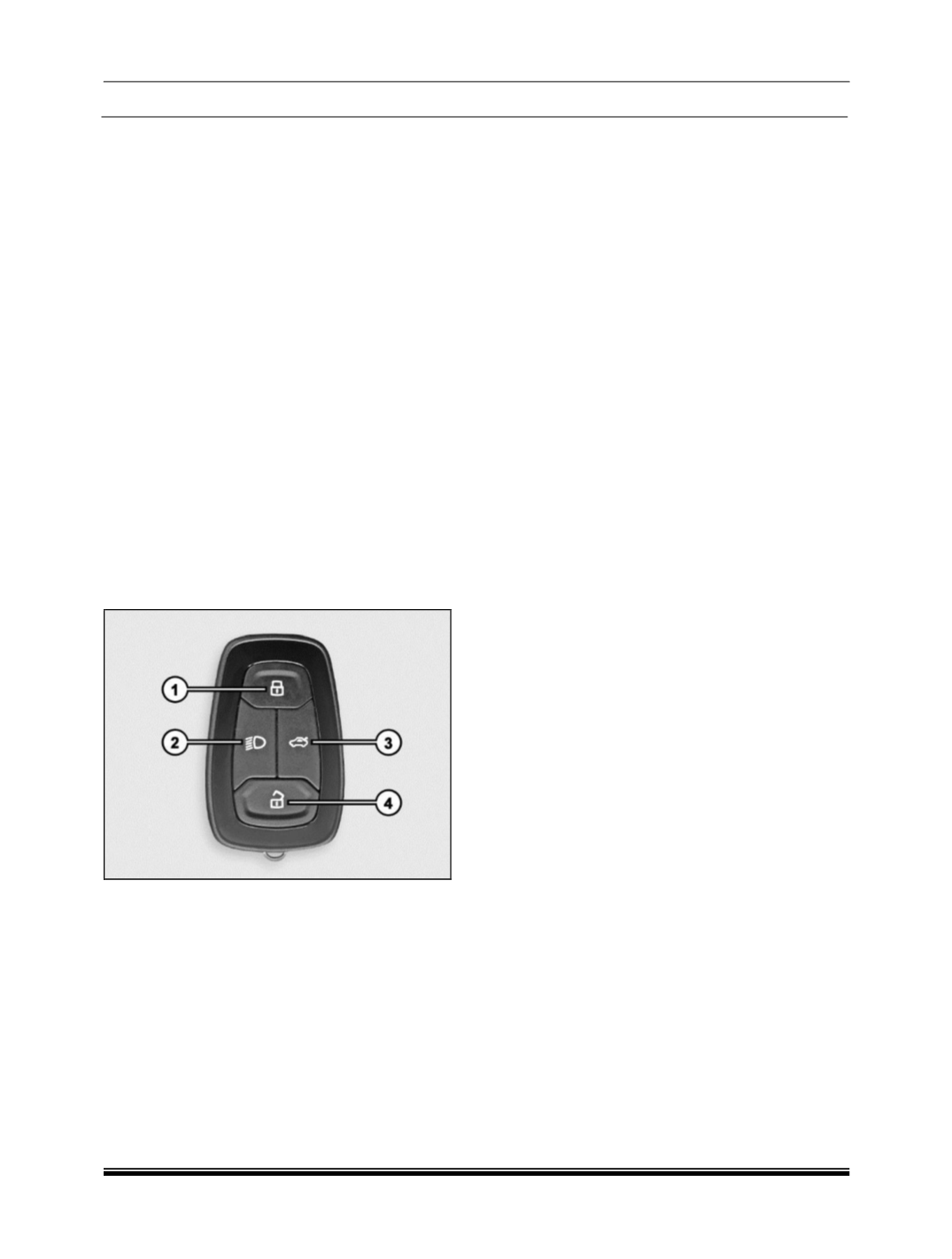
1. Locking all doors
2. Approach Light
3. Tailgate opening
4. Unlocking all doors
Smart Key is used as a passive key for Passive
Entry and Passive Start operation. The Smart Key
is same RKE remote (with all its existing
applications) having additional capability of
receiving LF Signal and transmitting RF signal
required for passive access to the vehicle.
The Smart Key permits or denies the passive
access to the vehicle based on the received RSSI
and security validation. Passive key facilitates the
user to access the vehicle without actively using
the key fob ensuring comfort and security. Smart
Key consist of 4 buttons namely lock, unlock,
tailgate unlock and approach lamp button.
1. Vehicle Unlock Operation
When Vehicle is in locked condition and user
presses unlock button on Smart Key, all doors
gets unlocked. After successful unlock, flasher
indication comes ON once.
2. Vehicle Lock Operation
When vehicle is in unlocked condition and all
doors are closed and user presses the lock button
on Smart Key, Vehicle gets centrally locked. After
successful lock, flasher indication comes ON
twice.
After unsuccessful lock, reverse unlock happens
in case of driver door ajar condition and slam lock
happens in case of other door ajar condition with
mis-lock sound.
3. Approach Light Operation
Approach light ON operation:
When vehicle is in OFF mode (ACC, IGN and
Crank are OFF) and user presses the Approach
Light button on Smart Key, Approach lights (Low
beam, position lamps and roof lamp) turns ON.
Approach light OFF operation:
When user presses the Approach Light button
again if approach lamps are ON OR Approach
lamp timer elapses Approach Light turns OFF.
4. Tailgate Release Operation
When vehicle is lock and vehicle power mode
is OFF
If tailgate switch is pressed within 30 second after
RKE tailgate command, tailgate gets unlock
independent of smart key.
When vehicle is unlock
If first RKE tailgate unlock is pressed and
then vehicle ignores RKE tailgate unlock
command.
NOTE
Tailgate cannot be locked using tailgate button
on Smart Key.