




 1447 / 1906

ELECTRICAL
145
DRIVE MODE SELECTION
The default mode in every Ignition ON shall be AUTO mode, User can select the Drive mode by rotating the
Drive mode switch in clockwise or anticlockwise direction when the Ignition is ON or Engine running
condition.
User has to hold the Drive mode switch in desired mode more than 1 sec for proper system behavior on the
user selected mode.
NOTE
User has to wait to select the new drive mode if any earlier drive mode request already is in progress. If
again user is trying to change the new drive mode when earlier transition is in progress the text message
“Drive Control Shift Denied”
shall be displayed on the IPC display.
a) Vehicle applicability: XT (4x4) With TOD
AUTO to COMFORT mode
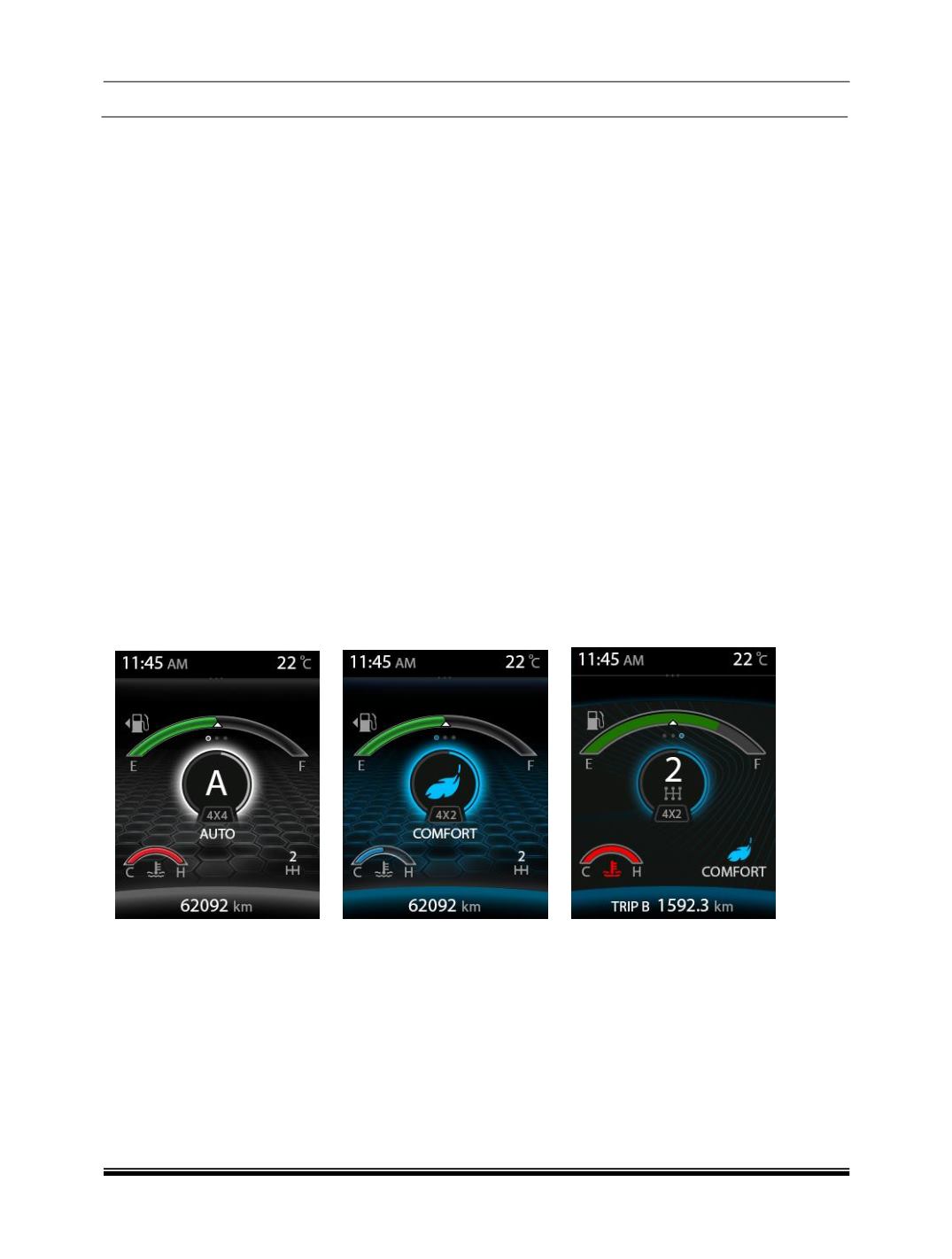
When the User is selecting the Drive mode from AUTO to COMFORT, the mode change progress shall be
displayed by blinking TOD mode 4X2 in the Instrument cluster and the Drive mode” COMFORT “shall be
POP UP for 3 secs in the center of the display, after 3 secs the current gear number shall be displayed in the
center of the display and Drive mode shall be displayed in the right bottom of the display and the back
ground theme shall change from White to Cyan color
Note:
When TOD mode (4X4 or 4X2) is blinking the on the Instrument Cluster display, the user is not allowed to
change the Drive mode because which is indicating that the already user selected mode transition in
progress.
Current Drive mode (AUTO) User Changed Mode (COMFORT)
POP UP For 3 sec
After 3 sec
Caution:
If any failure in the system, all four / three mode shall be illuminated on the Drive control switch and only the
AUTO mode is available to user.
AUTO to ROUGH ROAD mode:
When the User is selecting the Drive mode from AUTO to ROUGH ROAD mode, the mode change progress
shall be completed approximately 1 sec and the Drive mode” ROUGH ROAD “shall be POP UP for 3 sec in
the center of the display, after 3 sec the current gear no shall be displayed in the center of the display and
Drive mode shall be displayed in the right bottom of the display and the back ground theme shall change
from White to Yellow color.