




 721 / 745

ELECTRICAL
79
Deactivation Procedure:
To de-activate the system, disengage the reverse
gear. "The system can also be deactivated
through cross icon on infotainment screen if it was
activated through infotainment screen."
NOTE
1. While Park Assist is running, doing Ignition
OFF will switch OFF the Park Assist
functionality.
2. Before Ignition OFF, if reverse gear is already
engaged then if you do Ignition ON, Park
Assist will start automatically.
There is no way to permanently disable Park
Assist feature in the vehicle.
Park Assist Button LED Indications (If
equipped):
Yellow LED located on Park Button which is on
fascia switch will glow in the following scenarios to
convey the user about healthiness, activation and
deactivation state of Park Assist system.
1. On start of ignition, if the LED is ON for 1
second, this indicates park assist system is
healthy.
2. On start of ignition, if the LED is getting ON
and OFF for 10 times, this indicates Park
Assist system failure due to any of the
following reasons, such as one or more sensor
failure, wiring harness failure, Park Assist
Controller failure, Infotainment Music system
failure, Instrument Cluster failure. There after
Park Assist button never glows in that ignition
cycle. If this occurs, please contact TATA
dealer to resolve the problem.
3. If Park Assist feature is activated, LED will
glow until it is deactivated.
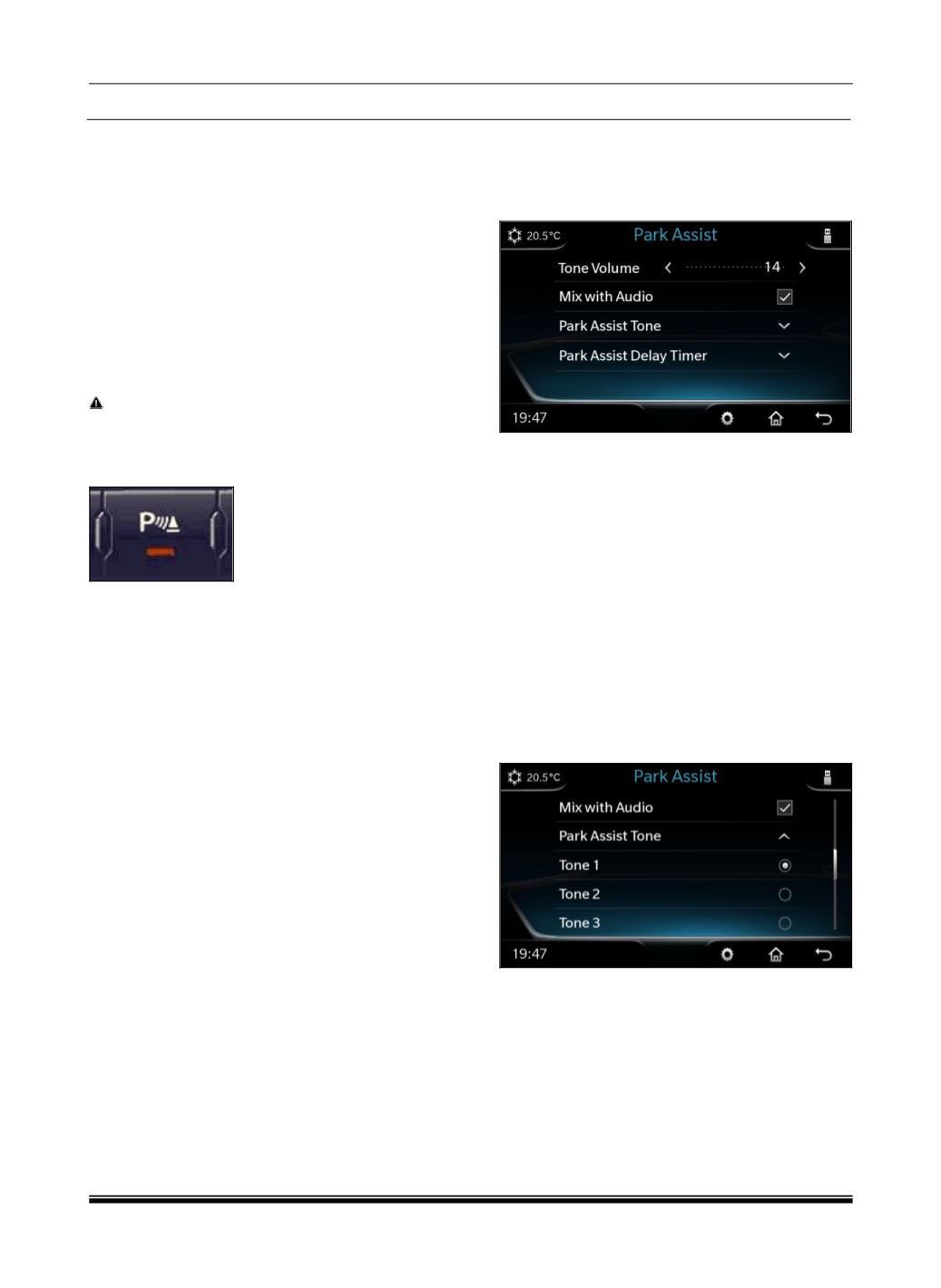
Park Assist Audio Settings:
To change Park Assist audio settings related
options, you have to do following sequence of
operations.
Go to
“Set Up -> Vehicle Setup -> Park Assist ->
Tone volume
Park Assist Volume Setting:
Increase or decrease volume by tapping
⊖
or
⊕
symbols on the infotainment music system touch
screen.
Mix With Audio
By default, Park Assist volume is mixed with
infotainment system audio. “Mix with Audio“ option
allows you to enjoy music even when park assist
is active. With this option, Park Assist warning
tone and media tone are smartly mixed together in
such a manner that park assist warning tone
sounds louder than media tone when park assist
is active.
Park Assist Tone
You can select 3 different types of Park Assist
tones. To change any tone you have to following
sequence of operations,
“Set Up -> Vehicle Setup -> Park Assist -> Park
Assist Tone“
Park Assist Delay Timer:
If Park Assist system is deactivated by “Reverse
Gear”, it will take certain configurable time period
to go to previous infotainment screen. This is to
ensure that, Pak Assist should not switch off
immediately for repeated engagements /
disengagements of reverse gear.
You can configure this delay time period by the
following sequence of operations,