




 1309 / 1906

ELECTRICAL
7
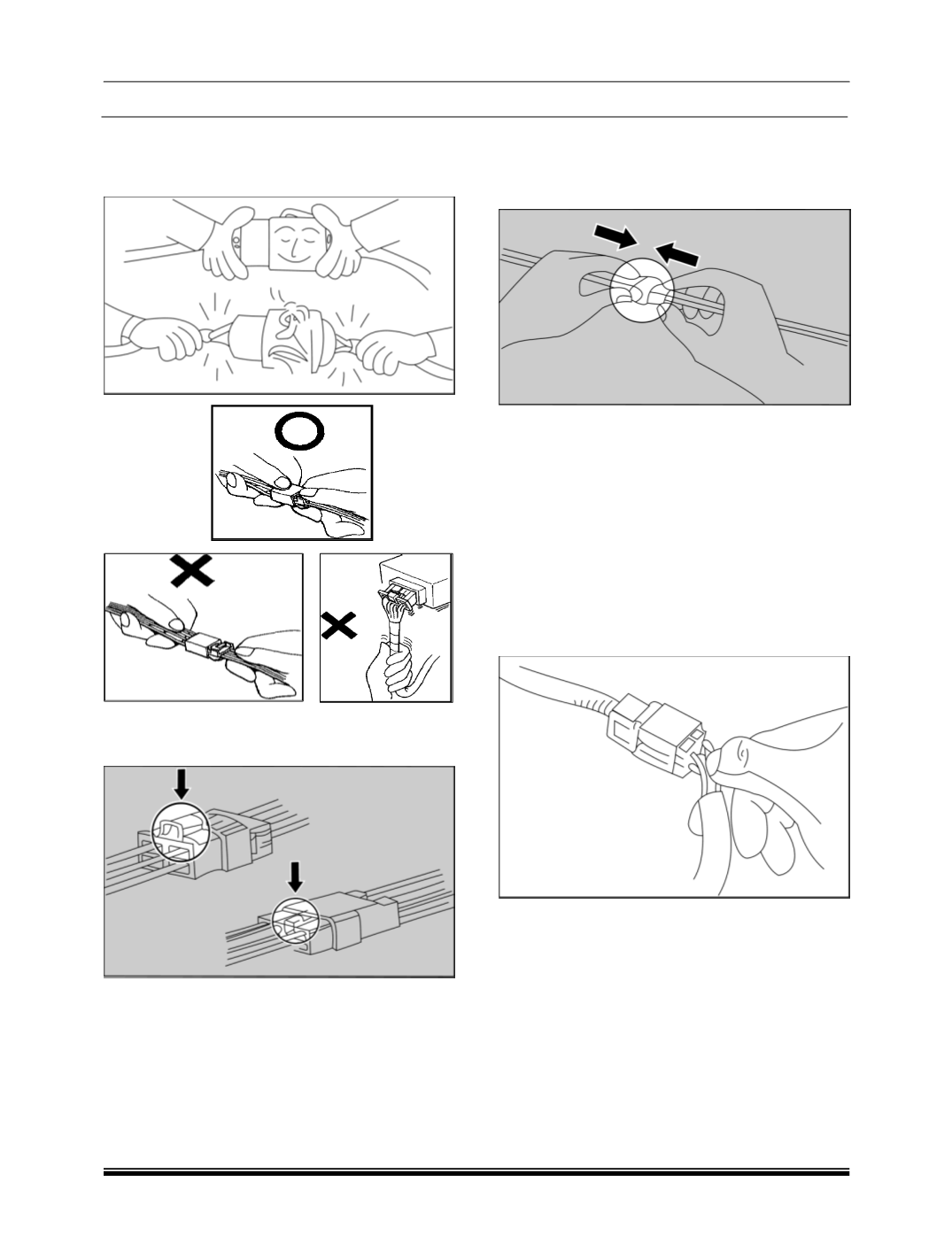
b. When disconnecting a connector pull it off from
the mating connector by holding on both
connectors. Never try to disconnect connectors
by pulling on their wires.
c. While disconnecting the interconnection
connector, press in the direction indicated by
arrows in the illustration.
d. While connecting the interconnection
connectors, insert the connectors until a “snap”
noise is heard.
e. Dirt / corroded terminals result in improper
contact. The terminals should be cleaned
carefully. Improper contact pressure between
mating terminals disturbs the connectivity
between them. Replace the damaged
connector body to avoid exposure of the
terminals in case of inadequate contact
pressure.
Ensure proper connection between the terminals to
the wire. Rectify the loose connection by repairing /
replacing the wire harness. Worn out insulation of
the wire may result in short circuit. Avoid water
entering in the connectors.
11. Before removing a faulty component, refer to
the Workshop Manual for removal procedures.
Ensure the starter switch is turned to the ’OFF’
position, the battery is disconnected and any
disconnected harnesses are supported to avoid
any undue strain at terminals. When replacing
the component keep oily hands away from
electrical connection areas and push
connector’s home until any locking tabs fully
engage.