



 1011 / 1236

ELECTRICAL
233
ELECTRICAL
SEEK DOWN:
a) In AM/FM mode, changes to previous preset.
b) Short press on this switch in CD/USB mode goes to previous track.
c) Long press on this switch in CD/USB mode results fast reverse operation on current
track.
d) Short press on this switch helps user to traverse down options present in Bluetooth
phone menu if user tries to pair mobile with Bluetooth.
e) Short press on this switch helps user to traverse down options present in User's mobile
phone menu if user mobile with Bluetooth is already paired with the infotainment
system.
3
VOL–
Switch: Reduce Audio volume level,
VOL+
Switch: Increase Audio Volume level.
NOTE:
For Combi switch other details refer switches section.
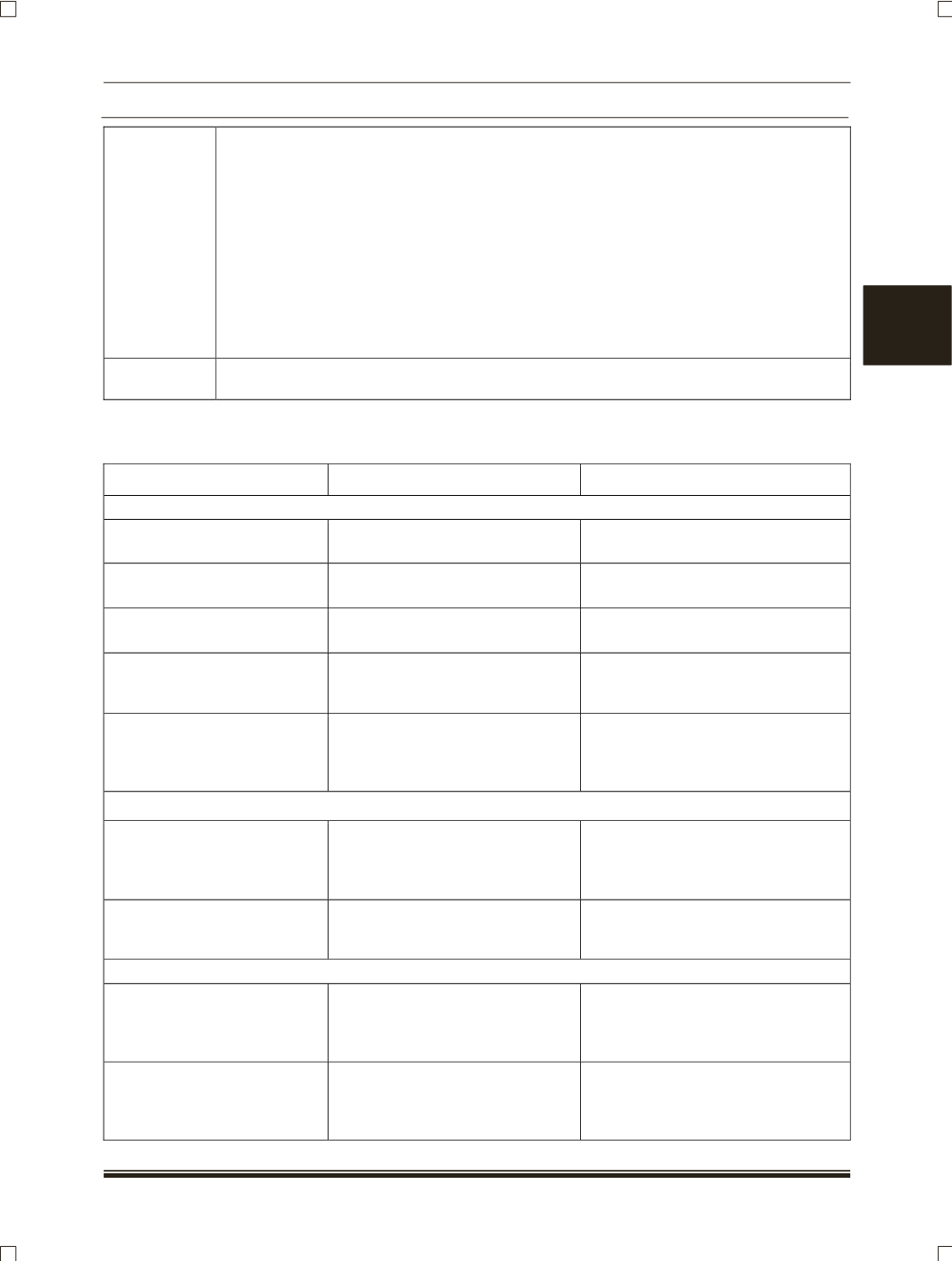
8.16.3 TROUBLESHOOTING PROCEDURES:
CONDITION
POSSIBLE CAUSE
REFERENCE ITEM /CORRECTION
DISPLAY
No display
Vehicle battery might get
discharged.
Charge the vehicle battery.
Display malfunction
Display EEPROM values may get
corrupted.
Replace the display.
Music system is operated but,
not able to turn on display
Fuse may get blown off.
Replace the 5A music system fuse.
Audio from the speakers
seems to be low
a) Loose connection.
b) Any one of the speakers may
not work.
Check the connection of speaker
and rectify it.
Music system is unable to
catch the signal on auto seek,
continuously searching in the
AM/FM band
a)
Loose connection of antenna
cable at radio side.
b)
Loose connection of antenna
cable at antenna side.
a) Remove the antenna cable form
the radio and reconnect.
b) Check the antenna connection at
centre.
CD
"Error CD" message is
displayed on the display
a) CD is scratched/dirty.
b) CD is incorrectly inserted.
c) CD has incompatible format
files.
a) Clean the CD and insert it back.
b) Remove CD and insert correctly.
c) Inset the CD which has compatible
files.
"No CD loaded" message
appears on the display even
though CD is loaded
CD drive faulty.
System to be replaced.
BLUETOOTH
"No devices found" message
appears even though
Bluetooth mobile is there in the
range
a) Directivity issue
b) Compatibility issue
a) Try for the connection from driver
seat.
b) All mobiles are not supported by
this system.
"Pairing failed" message
appears if we try pair the
mobile
a) Incorrect PIN number.
b) Paired devices in the mobile
paired devices are full.
a) Check the PIN number, correct
and try for pairing
b) Delete the paired devices in the
mobile and try to pair.