



 893 / 1235

ELECTRICAL
115
ELECTRICAL
REMOVAL:
1.Remove the glove box assembly
(Refer Glove
box removal procedure in body section).
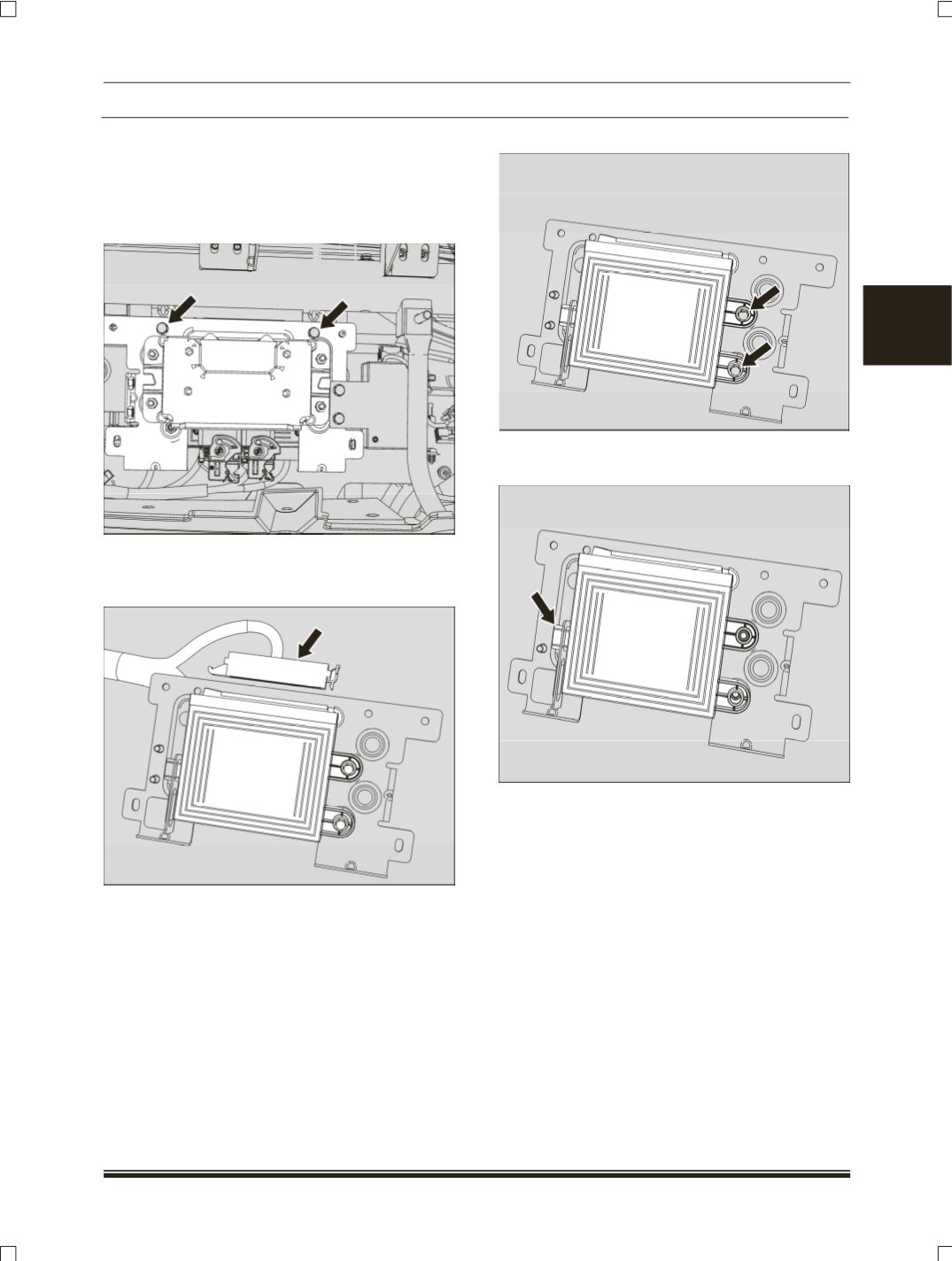
2.Remove the two mounting bolts of BCM mtg bkt
mounted on assembly dash cross member.
3.Tilt the BCM mtg bkt and disconnect the
electrical connection of window winding
controller.
4.Remove the two mounting bolts.
5.Dislocate the window winding controller from the
locator.
6.Take out the controller.
REFITMENT:
1.Locate the window winding controller on the
locator.
(Refer above given exploded view of
window winding controller while fitment)
2.Tighten the two mounting bolts of window
winding controller on the BCM mtg bkt.
Tightening torque for bolts – 0.6 Kgm
3. Connect the electrical connection.
4. Tighten the two mounting bolts of BCM mtg bkt
on the assembly dash cross member.
Tightening torque for bolts – 0.6 Kgm
4. Fit the glove box assembly.